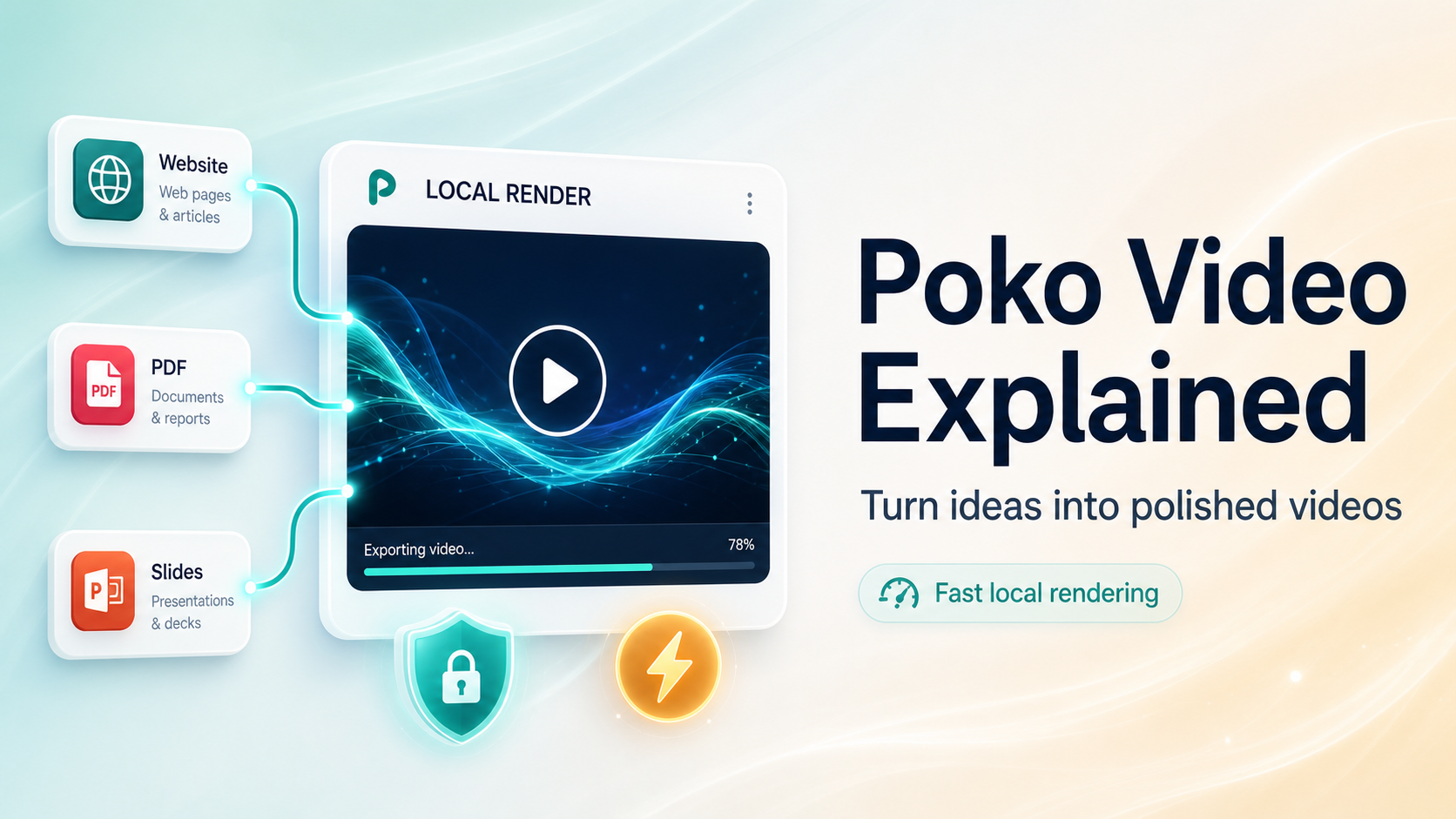
Poko video is a desktop AI video tool for Mac users. It turns websites, PDFs, PowerPoints, or repos into motion videos. It writes the script, builds scenes, adds motion, and renders MP4 files. As I said, you stay on your own hardware the whole time. Your code and documents stay local and do not upload to their servers. The thing is, that makes Poko video interesting for privacy focused teams. You chat with the agent to edit scenes instead of dragging timelines. The way I see it, this feels like a new take on editing. Guess what, the tool also supports brand styling and AI narration credits. At the end of the day, Poko video aims to ship more videos faster.
Poko video Review: Turns Your Website Into High-Converting Demo Videos:
Poko video Pros and Cons:
Pros:
- Saves time with automatic scripts and chat based editing.
- Local rendering avoids cloud queues and keeps files on device.
- Strong privacy model with BYOK options for advanced teams.
- Infinite canvas helps agencies manage many clients visually.
Cons
- Mac only focus limits use for Windows based video teams.
Poko video Monthly pricing overview
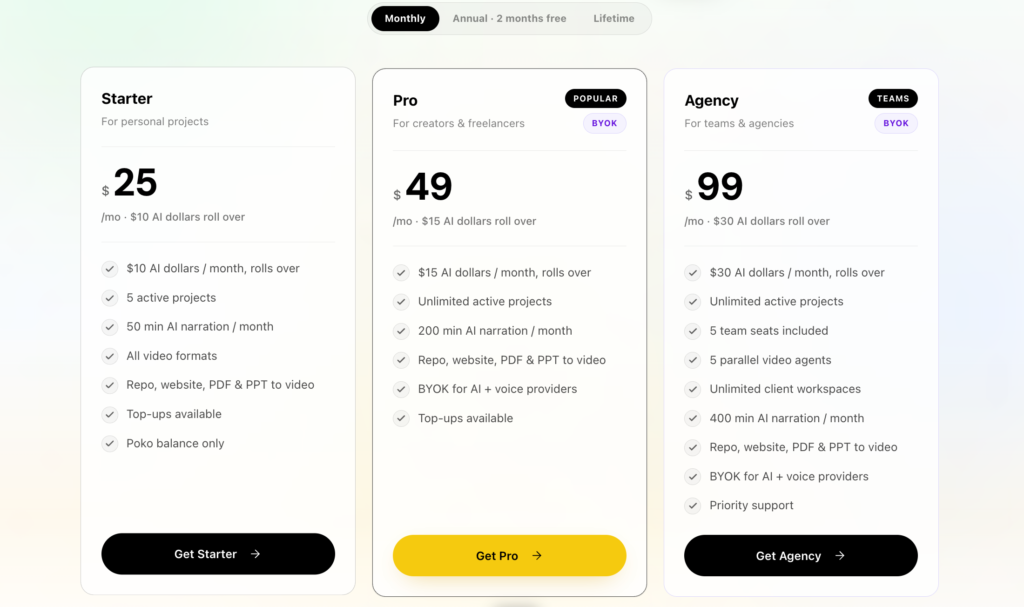
At the present time Poko video sells monthly plans on its site. Starter costs $25 per month with $10 in AI dollars. Pro costs $49 per month with $15 in AI dollars.
Agency costs $99 per month with $30 in AI dollars. AI narration minutes scale from 50 to 400 per month. All plans support repo, website, PDF, and PPT to video. Pro and Agency add BYOK, voice cloning, and more agents.
Subscriptions let AI dollars roll over rather than expiring. The way I see it, monthly makes sense for light usage or trials. Long story short, frequent users should compare this against lifetime tiers.
Poko Video Key Features:
01: No manual scripting
No Manual Scripting in Poko video means the agent writes the script. You point it at a URL, PDF, deck, or repo. The agent reads the content and understands the offer or topic.
Then it drafts narration lines that match the structure of your source. I was wondering how good this feels for busy founders. The funny thing is, you skip blank page stress completely.
You know what, you can still tweak lines through chat if needed. Correct me if I’m wrong, but this saves copywriting time. In my opinion this lets solo creators ship explainer videos faster.
All things considered, No Manual Scripting helps you focus on ideas, not writing.
02: Faster video editing
Faster Video Editing in Poko video comes from its chat editor. You see a live preview while the agent edits under the hood. Just between you and me, that feels natural for non editors.
You type simple commands like “make it faster” or “change colors.” The AI updates scenes while you keep watching the preview window.
The way I see it, this beats dragging keyframes for small tweaks. As far as I know, editors still keep control over pacing and style. Poko video cuts the boring first cut phase for many client projects.
Long story short, you reach a usable draft in minutes, not hours. At the present time this speed matters for social, launches, and product demos.
03: Zero render queue
Zero Render Queue means Poko video renders on your Mac locally. There is no cloud VM, no upload, and no remote queue. As a matter of fact, M‑series Macs render 30 seconds in under 60 seconds.
I couldn’t help but notice how nice this feels under tight deadlines. You press render and the MP4 lands in your Downloads quickly. The thing is, you avoid per render fees or bandwidth issues.
If I’m not mistaken, this helps agencies handle many small videos daily. In close proximity to a launch, waiting for a queue hurts campaigns. With the help of local rendering, your team moves without cloud limits. At the end of the day you stay in control of time and files.
04: On‑device privacy
On-Device Privacy is a core pillar of Poko video. Source files like repos, PDFs, decks, and generated projects stay on disk. Their agent sends only needed text excerpts as LLM prompts.
Prompt bodies do not persist after the response. Usage logs keep tokens, model, and latency, not project content. I hate to say this, but many tools still upload full files today.
Poko video keeps your sensitive code and docs local by default. As far as I know, public URLs are the only remote capture.
For full privacy you can bring your own AI key and bypass their proxy. All things considered, privacy minded teams and dev shops will appreciate this.
05: Flexible AI models
Flexible AI Models give Poko video more control over cost and quality. On Pro and Agency plans you get BYOK for AI and voice providers. Claude and ChatGPT subscription connections are supported on lifetime editions. OpenRouter and local models also integrate for advanced users.
I see your point, but some people want one fixed model only. To be fair, choice helps match budget and tone per project. The fact that you can route agents across providers is handy for teams.
Come to think of it, you can test which stack works best for product demos. Poko video gives power users freedom without locking them into one vendor. For what it’s worth, this level of control rarely appears in basic generators.
06: Automatic brand styling
Automatic Brand Styling in Poko video reads brand colors and fonts. From a repo or site, the agent extracts design cues automatically.
It then applies layouts, colors, and motion that match your product. I couldn’t agree more that branding consistency matters for SaaS demos.
Guess what, this cuts the need for manual style guides inside the editor. If you ask me, agencies gain real time savings across many clients. The way I see it, Poko video keeps every video on brand by default.
In the near future, premium animations will add more polish for agencies. With regards to multi channel assets, this helps keep a unified look. At the present time, Automatic Brand Styling feels like a practical bonus.
07: Real-time preview
Real-Time Preview keeps you close to the final look in Poko video. As the agent edits, the preview window updates on your screen.
You see timing changes, color shifts, and layout tweaks instantly. I was wondering how many revisions this saves for client work.
Now that you mention it, live feedback helps non technical stakeholders. They react to what they see, not guess from abstract descriptions. In the majority of cases this shortens review cycles significantly.
Poko video uses this preview to connect chat commands with visible changes. To cut a long story short, you trust the tool more when you see results. At the end of the day, Real-Time Preview reduces surprises at export.
08: Voice cloning support
Voice Cloning Support appears on Pro and Agency plans in Poko video. Pro includes five voices and Agency includes ten voices. This lets teams keep consistent narrators across many product demos. The way I see it, that helps brand recognition on social channels.
By means of voice cloning, you avoid hiring voice talent for every video. In most cases you just feed samples and let AI handle narration. I see your point, but some brands still like human recording.
If you don’t mind me saying, this feature suits fast content workflows. Poko video pairs cloned voices with AI scripts for smooth output. All things considered, voice cloning support adds nice polish for agencies.
09: Multi-project management
Multi-Project Management shines through Poko video’s infinite canvas. You get Figma style drag, zoom, and arrangement for project cards. You drop text labels anywhere to group clients and campaigns. Workspace layouts save per workspace, so things stay where you left them.
Now that you mention it, this looks helpful for busy agencies. The fact that there are client workspaces on Agency plans adds structure.
Parallel agents run across projects, with a smart queue respecting limits. I couldn’t help but notice this feels like a real production board.
Poko video builds a studio view instead of a simple list of files. At the end of the day, Multi-Project Management supports daily video work.
10: Fast Mac rendering
Fast Mac Rendering is central to the Poko video experience. Their site mentions M-series Macs handle 30 seconds under one minute.
That reminds me of traditional editors with slow exports and crashes. Here, the agent uses your hardware to push out MP4 files quickly. As far as I know, Intel Macs are supported too for broad coverage.
The thing is, fast renders help test variations for ads and demos. You try a new script, render, and share with the team quickly. In the near vicinity of a launch, time savings compound.
Poko video makes speed part of the promise, not a side detail. For what it’s worth, this makes the lifetime deal more interesting.
11: Ready-to-share MP4
Ready-To-Share MP4 exports are the final step in Poko video. After chat editing and preview checks you hit Render. The app outputs an MP4 file directly into your Downloads folder.
This format works for YouTube, social ads, and email embeds. I couldn’t agree more that simple output is better than complex pipelines.
The way I see it, users then move to hosting or scheduling tools. Poko video focuses on turning source material into a finished video file.
At the present time, MP4 remains the standard for online video sharing. Guess what, this makes handoff to clients straightforward too. All things considered, Ready-To-Share MP4 keeps the workflow clean.
FAQ
What formats can I upload?
You can start with almost anything: full code repositories, live website URLs, PDFs, PowerPoint decks, research papers, or even just a prompt for animation. The system adapts your input into a polished video automatically.
Do I need extra setup?
No setup needed. The app comes fully loaded with all required tools, so you can start creating immediately without installing anything else.
Which AI powers the videos?
Claude Sonnet is the default model, chosen for its balance of quality and cost. Advanced users can connect their own AI keys for more flexibility.
How does billing work?
You pay only for what you use. Each plan includes starting credits, and you can top up anytime. Custom AI integrations are available on higher plans, while media assets are billed separately at minimal cost.
What’s the typical cost per video?
Most videos cost between $1–$3 for the first version. Edits are usually cheaper, making iteration very cost-efficient.
Read More: Reelify Lifetime Deal | Best Video Shorts Creator App
Poko video fits several clear use cases for solo founders and teams. Product demos from repos or landing pages help SaaS explain features. Slide videos from PDFs and decks help startups share pitches quickly. Speaking of which, agencies can turn client sites into social promo clips.
Video editors can generate first cuts for explainer projects, then refine. Marketers can test ad angles without booking full production every time. Indie hackers ship launch clips based on changelogs or docs.
To cut a long story short, Poko video works wherever content already exists. The way I see it, this fits your lead gen and SaaS workflow nicely.
To be honest, Poko video feels built for busy product people. It turns existing assets into motion videos with little friction. Privacy, local rendering, and flexible AI models add real practical value. Lifetime pricing looks fair if you plan regular demos or client work. I see your point, but Mac only support is a real limit. In my opinion, SaaS founders, agencies, and freelancers should test Starter first. If usage stays high, upgrade to Pro or Agency lifetime tiers. At the end of the day, Poko video is a solid AppSumo style pick. Just between you and me, this fits your lead gen and SaaS content nicely.