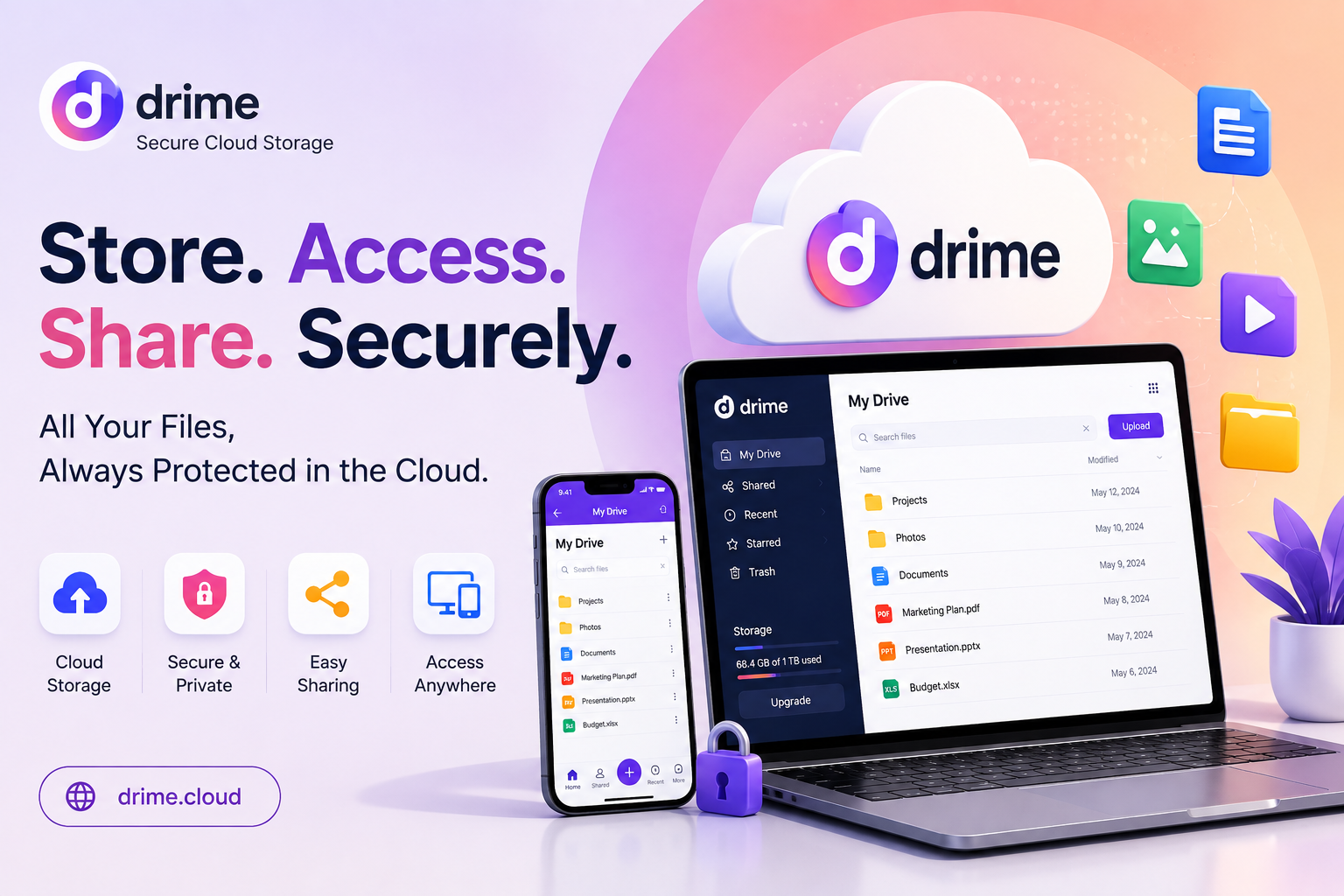
Drime Cloud gives you one workspace for files, docs, and team work. This review covers features, pricing, and value. You will see if this lifetime deal fits your business.
Drime Cloud is a cloud storage and collaboration platform. It stores your files with encryption and lets teams work together in one place. The tool replaces separate apps for docs, e-signatures, and video streaming. Users edit Office files, sign documents, and stream 4K video without extra software.
Drime Cloud works for solo creators, agencies, and growing teams. You get 20GB free storage to start. Paid plans scale up to multiple terabytes. This makes Drime Cloud a practical pick for anyone who manages many files across projects. let’s start Drime Cloud Lifetime Deal review.
Drime Cloud Lifetime Deal: Best Secure Storage Review in 2026 :
Drime Cloud Pros and Cons:
Pros
- Combines storage, editing, and collaboration in one platform
- Lifetime deal removes recurring monthly costs
- Built-in PDF and Office editing saves subscription money
- Simple large file sharing works well for agencies
- AI notes feature speeds up writing and planning tasks
Cons
- Advanced enterprise features may lag behind larger established platforms like Google Workspace
Drime Cloud Monthly Pricing Plan:
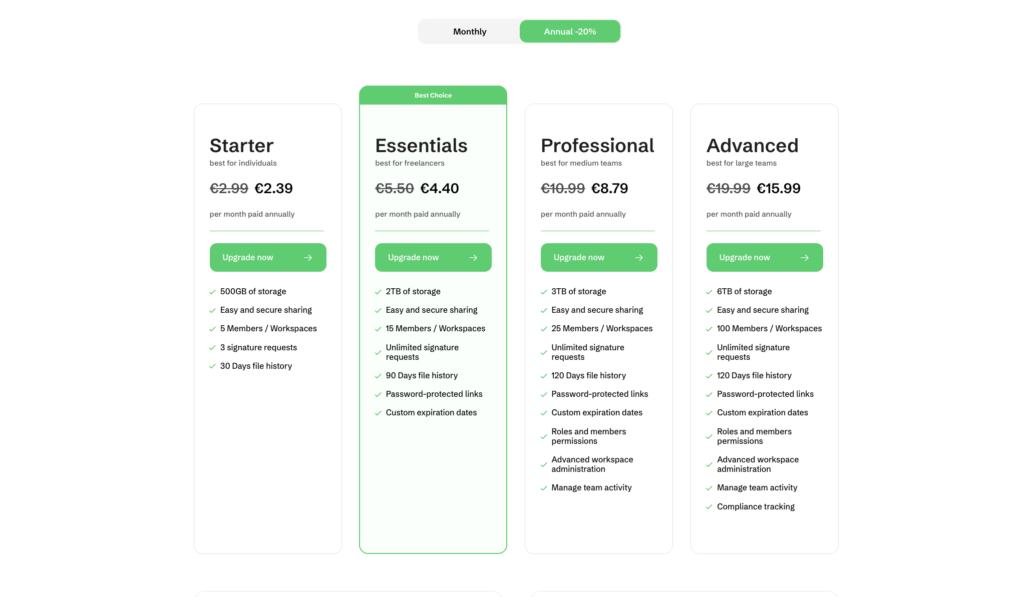
Drime keeps pricing simple, with plans designed to grow alongside your storage and team needs. Everyone starts with a free tier offering 20GB of storage, perfect for testing the platform before committing.
For solo users, the Starter plan costs €2.39 per month (billed annually) and includes 500GB storage, 5 members, 3 signature requests, and 30 days of file history.
Freelancers can upgrade to Essentials at €4.40 per month, unlocking 2TB storage, 15 members, unlimited e‑signatures, and password‑protected sharing links. Medium-sized teams benefit from the Professional plan at €8.79 per month, which adds 3TB storage, 25 members, custom link expiration, and advanced workspace controls.
Large teams get the most value from Advanced at €15.99 per month, featuring 6TB storage, 100 members, compliance tracking, and full activity management. All paid plans include secure sharing and unlimited signature requests, while annual billing saves 20% compared to monthly rates. Enterprise pricing is available on request for organizations with custom needs.
Drime Cloud Lifetime Deal:
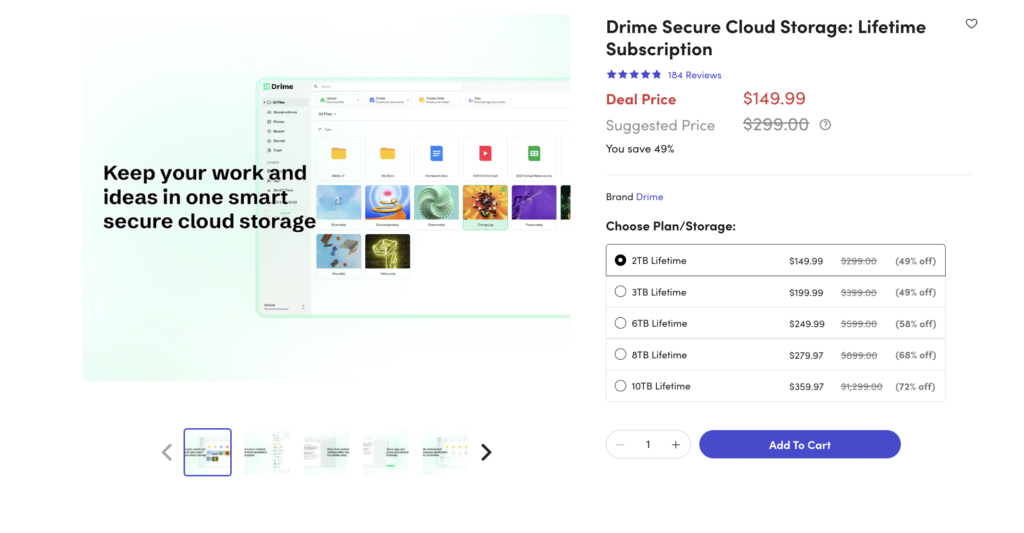
Drime’s lifetime deal on StackSocial offers a compelling alternative to endless monthly subscriptions. The Essentials 2TB plan is available for a one-time payment of $112.49, down from a suggested price of $299.00, making it 62% off.
Higher tiers scale up to 10TB for $359.97, with discounts reaching 72% off on the largest plan. Every tier includes EU-hosted, GDPR-compliant storage, unlimited file size uploads, and an end-to-end encrypted Vault using 256-bit AES and SSL/TLS encryption.
Users also get built-in document and media editing, e-signatures via Drime Sign, advanced link sharing with passwords and expiration dates, and 120 days of file version history. With a 4.8/5 rating from 152 verified reviews, buyers praise its fast uploads and rich feature set as a strong Google Drive or OneDrive alternative.
Drime Cloud 10 Key Features:
01: All-in-one Cloud Workspace
Drime Cloud combines storage, editing, and sharing in one dashboard. You skip switching between five different apps daily. Your files, docs, and media stay in one login. Teams save time because everything sits in a single workspace. This setup helps agencies manage client files without confusion.
Drime Cloud cuts the need for separate subscriptions to other cloud tools. Small teams and solo users both benefit from this simple structure. The dashboard shows recent files, shared folders, and team activity at a glance. You control access levels for each team member.
This feature saves setup time when onboarding new staff. Businesses that juggle many client folders find this workspace approach useful. The single-login system also reduces password fatigue for teams. Overall, this feature forms the base of what makes Drime Cloud practical for daily work.
02: Direct Office File Editing
You edit Word, Excel, and PowerPoint files right inside Drime Cloud. No need to download files first or open separate software. Changes save automatically as you type. This feature helps remote teams edit documents together in real time. You avoid version control problems common with email attachments. Small agencies use this to draft client reports fast.
Freelancers use this to edit invoices without leaving the platform. The editor keeps formatting intact when you open Office files. This matters for professional documents like proposals and contracts. Teams working across time zones benefit because edits sync instantly.
You do not need Microsoft Office installed on your device. This cuts software costs for small businesses. The feature works inside your browser, so it runs on any device with internet access. This makes Drime Cloud flexible for teams using different operating systems.
03: Built-in PDF Tools
Drime Cloud lets you edit, merge, and split PDF files without extra software. You add text, images, or signatures directly on PDF pages. This saves money because you skip paid PDF editor subscriptions. Freelancers use this to prepare contracts and invoices fast.
Marketing agencies use this to tweak client proposals before sending. The tool keeps PDF formatting clean after edits. You convert PDFs to other formats when needed. This helps when clients request Word or image versions of a document. The PDF tools work directly in your browser tab.
You do not install any plugin or app. This matters for teams that handle many client documents daily. Agencies that send contracts often will find this tool saves real time.
The built-in PDF editor removes a common bottleneck in document workflows. This feature alone can replace a separate PDF subscription tool many businesses already pay for.
04: Image Crop and Annotation
Drime Cloud includes basic image editing tools. You crop, resize, and annotate images without opening Photoshop or Canva. Add arrows, text boxes, or highlights directly on images. This helps when explaining feedback to clients or team members. Content creators use this to prepare quick social media graphics. Marketing teams use this to mark up design drafts for revision.
The annotation tool works well for approval workflows. Clients mark exactly what needs changing on a design file. This cuts back-and-forth email chains about image edits.
The crop tool helps resize images fast for different platforms. You do not need separate image editing software for quick tasks. This feature fits teams that create visual content daily.
Agencies managing client social media find this tool useful for fast turnarounds. The built-in editor handles common tasks without forcing you to open a heavy design app.
05: Browser-Based Video Trimming
Drime Cloud lets you trim video clips directly in your browser. No need to download heavy video editing software. Cut unwanted parts from the start or end of a clip. This works for quick edits before sharing content with clients or teams. Content creators use this to prepare short clips for social media. Agencies use this to trim client video assets fast.
The trimming tool keeps video quality intact after edits. You save the trimmed clip directly to your Drime Cloud storage. This cuts steps compared to using desktop video editors for simple cuts. Teams that handle daily video content save real production time here.
The feature works well for social media managers who need fast turnarounds. You skip exporting and re-uploading files between different apps. This makes video workflows faster for teams producing daily reels or short clips for platforms like YouTube and Instagram.
06: Smooth 4K/8K Streaming
Drime Cloud streams high-resolution video without buffering issues. You watch 4K or 8K files directly from storage. No need to download large video files first. This helps video editors review footage fast during projects. Agencies working with high-res client videos benefit from smooth playback.
The streaming feature saves local storage space on your device. You avoid slow downloads before reviewing raw footage. Content creators use this to check video quality before final export.
Teams working remotely stream project files without local copies. This matters for teams handling large 4K files for YouTube or client projects. The playback stays smooth even with large file sizes.
This feature helps creators avoid buying expensive local storage upgrades. Fast streaming also speeds up client approval since files play instantly instead of downloading first.
07: AI-Enhanced Drime Notes
Drime Notes uses AI to help you write and organize notes fast. You draft meeting notes, project plans, or content ideas inside the platform. The AI suggests improvements or summarizes long text blocks. This helps busy founders capture ideas without switching to a separate notes app.
Marketing teams use this to draft content calendars quickly. The notes sync across your team automatically. You avoid losing notes across scattered apps like sticky notes or random docs. This tool works well for brainstorming sessions with remote teams.
The AI feature speeds up drafting client proposals or SOPs. Agencies documenting processes find this useful for building internal guides. Notes stay linked to your files, so context never gets lost. This feature saves time compared to using separate note apps and copying content manually between tools.
08: Task Lists and Checklists
Drime Cloud includes basic task management tools. You create checklists for projects directly next to your files. Assign tasks to team members within the same workspace. This helps small teams track project progress without a separate app like Trello.
Agencies use this to manage client deliverables step by step. The checklist feature keeps tasks linked to relevant files. You mark tasks complete as you finish them.
This creates a clear record of project progress for clients. Teams avoid switching between project management tools and file storage. Freelancers use this to track deliverables for multiple clients at once. The simple design works well for solo users and small teams.This feature cuts the need for a separate task management subscription for basic project tracking needs.
09: Client Project Collaboration
Drime Cloud lets you invite clients into shared project folders. Clients view, comment, or approve files without creating a full account. This speeds up feedback cycles for agencies and freelancers.
You control what clients see and edit within each folder. This matters for agencies managing multiple client accounts at once. The collaboration tool reduces email threads about file approvals.
Clients leave comments directly on documents or images. This creates a clear record of feedback in one place. Teams avoid confusion over which file version is current.
Agencies find this useful for managing design or content approval workflows. The shared folder structure keeps client work separate and organized. This feature helps build trust with clients since they see progress directly instead of waiting for email updates.
10: Simple Large File Sharing
Drime Cloud lets you share large files through a simple link. No need to compress files or use separate transfer tools. Clients or team members download files directly from the link.
This works well for sharing raw video footage or design files. Agencies avoid email attachment size limits with this feature. You set link permissions like view-only or download access.
This adds a layer of control over shared content. The share link stays active until you disable it. Teams working with large media files save time using this method.
This cuts the need for separate file transfer subscriptions like WeTransfer. Freelancers use this to deliver final client files fast. The simple sharing process makes Drime Cloud practical for teams that send large files on a daily basis.
Read More: Poko video Review: Turns Your Website Into High-Converting Demo Videos
Drime Cloud packs storage, editing, and collaboration tools into one platform. Agencies and freelancers save money by skipping separate subscriptions for PDF tools, video trimming, and file sharing. The lifetime deal makes sense for teams planning long-term use. Solo creators benefit from the generous free tier before committing to a paid plan. Check the current AppSumo listing for exact pricing before buying, since deal terms can change.